Around fall 2020, my old desktop PC was on its last leg (it was running Intel Core Quad 9300 - so it was super old). I decided to get a reasonable powerful laptop with a dock that can drive two 2K (2560x1440) and one 1920x1200 monitors. So I purchased a X1 Carbon Extreme Gen 2 (running i7-9750H, 32 GB RAM) and Thinkpad Thunderbolt 3 Workstation Dock Gen 2 (40AN) - and I also purchased the Premier Support. But soon, it was apparent to me something was wrong. Lenovo and their team has been very professional in responding to the issue. Every call I made to the Premier Support team or email exchanges have been helful and courteous. They deserve a lot of credit in investigating the issue and trying to find a good resolution with me. In short, to the user (me), the external monitors will blink (goes blank and comes back within a second or less) and some times will go blank for a period of time (ranging from two seconds to several minutes, or in some minor instances actually never come back). After about 8 weeks, Lenovo admitted that there is a bug in their dock - or to be precise in the chip (from Synaptics) they are using in the dock. The bug is related to HDCP - which is digital copy protection to prevent copying of digital audio and video content (i.e. during streaming). Since this chip is being used in all their TB3 docks (and Lenovo said also being used in other brands like DELL and HP docks) and it cannot be fixed via firmware update, so Lenovo said they do not have a workable solution for this issue (for me and other dock owners). I ended up trying to get a refund for my dock.
I always use my laptop with the lid close, connected to the dock with the provided custom cable (which provide TB3 connection and power), with everything else connected to the dock (3 monitors, USBs, network).
The problem starts with intermittent screen flickering - which I initially dismissed as just small annoyance or maybe lose connection/cable. But it got to the point where it was annoying enough for me and I contacted Lenovo Premier Support. I started my case on January 4th and after about 11 weeks - it is now closed (but not resolved).
It also happened with https://eshop.macsales.com:
If you are interested in the chronological timeline of the saga, here it is:
For the video recordings of the issue - they are available here and here.
-- read more and comment ...




Showing posts with label performance. Show all posts
Showing posts with label performance. Show all posts
Tuesday, March 23, 2021
Lenovo Thinkpad TB3 Dock Saga
Topics:
dock,
gadgets,
hardware,
Lenovo,
performance,
technology,
thunderbolt,
Windows

Tuesday, March 10, 2015
Tire Tips For Your Car
In maintaining a car, tire purchase is always expensive but necessary. Every 4-5 years on average, you need to replace your tires. Depending on the size/measurement and type of your tires, this could translate to $300 to $1,000 to just purchasing new tires alone. Then adding cost of balancing, mounting, getting rid of your old tires, etc - you add another about $40 per tire. Although you only do this every 4-5 years, it is still quite costly. So how can we do some cost saving in this tire related stuff?
TIRE LIFETIME
Using your tire as long as possible is one way to do it, but if you are using bald tire, it can be very dangerous. So how can we get the best lifetime of our tires? There are three simple principles: tire pressure, balancing, and alignment. If you keep these 3 things in line then you have the possibility to get the most out of your tire lifetime. These 3 things basically deal with the evenness of your tire thread wear. If you have under-inflated tire(s), or an unbalanced tire(s), or misaligned car, it will create uneven wear - which will reduce the lifetime of your tire.
TIPS:
TIRE PURCHASE
You can get your tire measurements from your own tire, just look at the side wall and it will be written there, usually in this format: XXX/YY/RZZ. My minivan has these measurements: 235/65/R16. Or, you can go to www.tirerack.com and enter your car's year, make, and model - then it will tell you the original tire sizes/measurements.
Once you have your measurements/sizes, go to www.tirerack.com, click "Tires" and then "Survey Results". Now depending on your car type, and tire type, you want to select the tire type that you want. A few tips: "Summer" tire is unusable in the winter time, "Winter" tire is usable in non-winter times but has short lifetime. Since I live in Ohio, I always buy an "All Season" tire - which means I don't have to replace the set of tire seasonally. So I open each "All Season" option in a new tab in my browser and enter in my tire size on the left side under "FILTER BY" of the window and close the tabs that yielded no results. From that point on, it is just a matter of taste, preference, price, and survey results. For example, for my minivan (235/65/R16), I am choosing General AltiMAX RT43 (T-Speed Rated) as my top pick. Now if you are buying new tires, you put the tire in your basket, and pay and checkout from TireRack.com - you can ship it to your home, in which then you will need to take them to the tire shop to be installed later on, or you can ship them directly to the tire shop that you will be installing (assuming you already made an appointment with them).
TIPS:
PURCHASING USED TIRES
Another option is to buy used tires. There is a huge market for used tires - from junk yards, people swapping rims & tires, etc. These tires usually still have about 50-90% thread left, which means 2-4 years (or more). Now why used tires? Because they are "CHEAP" - I am talking REALLY REALLY CHEAP. Here is an example, a new tire for Continental ProContact (245/45/R18) cost about $210 per tire. In the used market, with 80% thread, you can get one for about $50-$60 (including mounting, balancing, and disposing your old tire). If you are not picky about brand, you can get cheaper ones that only cost about $35-$45 per tire for that size. For smaller size (for like a Civic or an Elantra etc), it can be cheaper still. I have seen someone walk out the door with 4 tires installed, balanced, and dispose old tires for $100. Getting used tire(s) is ideal when you do not need a whole set - sometimes you just need 1 tire or maybe a pair because of flat, sidewall damage, etc. Used tires are not ideal if you are a stickler to a particular brand/type, or if you have rare sizes - since they are used and cannot be special ordered.
TIPS:
My tire store is Katz Tires. They are old-school, been in Columbus forever, well-known tire shop in Columbus. They sell new and used tires. Their service is always impeccable, fast, economical, satisfaction guaranteed. They are a tire shop - so they sell, mount, and fix tires - nothing else. Katz is always the first shop I call if I need a used tire or a plug/patch. Here is a story where they just treat you above and beyond: I came in the other day because of a leak in one of my tire. My tire pressure indicator alerted me about it and I need to put about 10 psi of air every week. So after 2 weeks of leakage, I brought it to Katz. They took care of me right away, dismounted the wheel, checked for leaks, inspected the tire, and after 10 minutes or so, one of their staff came to me and said that they could not find a leak. I told them my story and they thought it was a just small leakage from dirty rim lip. So they cleaned the rim and the tire, remounted the tire into the rim, re-balanced the wheel, mounted the wheel into the car. When the staff gave me my key back and I was ready to pay - he said "free of charge, no need to pay". So I was a bit confused and asked him "Really? Are you sure?" He replied, "Absolutely. 100%. Bring it back if it still leaking and we will take another look." He just won a customer for life.
Don't believe me about Katz? Check out their Yelp review.
There is also a Firestone nearby my house where I do all my lifetime balancing and alignments. They treat me right, rarely push any services beyond what I need, and they are close to there I live. I also like Discount Tire, they are generally great, but they do not do alignment. So balancing & alignment in separate places just create too much hassle for me.
-- read more and comment ...
Using your tire as long as possible is one way to do it, but if you are using bald tire, it can be very dangerous. So how can we get the best lifetime of our tires? There are three simple principles: tire pressure, balancing, and alignment. If you keep these 3 things in line then you have the possibility to get the most out of your tire lifetime. These 3 things basically deal with the evenness of your tire thread wear. If you have under-inflated tire(s), or an unbalanced tire(s), or misaligned car, it will create uneven wear - which will reduce the lifetime of your tire.
TIPS:
- The standard manufacturer recommended tire pressure usually listed on a sticker inside one of your door.
- Most tire shop/place (Firestone, Goodyear, DiscountTire, etc) will check pressure and inflate your tire for free of charge.
- Most tire shop (at least I know Firestone, NTB, and DiscountTire) have a lifetime balancing deal. So you pay a fee ($15 per tire), but then you can balance your tires anytime you want as long as you own the same set of tires. I balance my tires every 6,000 miles or every 6 months. This is a lot cheaper compared to what the car dealership is charging you.
- Most tire shop (at least I know Firestone) have a lifetime alignment deal. So you pay a fee ($170 at Firestone), but then you can your car anytime you want as long as you own the car (some places only goes for 3-4 years). I check my alignment every time I balance my tires - every 6,000 miles or every 6 months. For a single standard alignment, it usually costs you about $70 - so within 3 alignments, I already got my money's worth.
TIRE PURCHASE
You can get your tire measurements from your own tire, just look at the side wall and it will be written there, usually in this format: XXX/YY/RZZ. My minivan has these measurements: 235/65/R16. Or, you can go to www.tirerack.com and enter your car's year, make, and model - then it will tell you the original tire sizes/measurements.
Once you have your measurements/sizes, go to www.tirerack.com, click "Tires" and then "Survey Results". Now depending on your car type, and tire type, you want to select the tire type that you want. A few tips: "Summer" tire is unusable in the winter time, "Winter" tire is usable in non-winter times but has short lifetime. Since I live in Ohio, I always buy an "All Season" tire - which means I don't have to replace the set of tire seasonally. So I open each "All Season" option in a new tab in my browser and enter in my tire size on the left side under "FILTER BY" of the window and close the tabs that yielded no results. From that point on, it is just a matter of taste, preference, price, and survey results. For example, for my minivan (235/65/R16), I am choosing General AltiMAX RT43 (T-Speed Rated) as my top pick. Now if you are buying new tires, you put the tire in your basket, and pay and checkout from TireRack.com - you can ship it to your home, in which then you will need to take them to the tire shop to be installed later on, or you can ship them directly to the tire shop that you will be installing (assuming you already made an appointment with them).
TIPS:
- If you are buying new tires from the big-box store, always go to Discount Tire. They always have the best price. Always. They even price-match.
- Always ask for lifetime balancing during your installation - you pay a bit more, but worth it. Read "TIRE LIFETIME" above.
- Never go to Monroe, Walmart, Sears, Midas, Meineke
- If you prefer local store instead of the chain-shops, go to Katz Tires in Columbus. Good people, fast, awesome prices, excellent customer satisfaction
PURCHASING USED TIRES
Another option is to buy used tires. There is a huge market for used tires - from junk yards, people swapping rims & tires, etc. These tires usually still have about 50-90% thread left, which means 2-4 years (or more). Now why used tires? Because they are "CHEAP" - I am talking REALLY REALLY CHEAP. Here is an example, a new tire for Continental ProContact (245/45/R18) cost about $210 per tire. In the used market, with 80% thread, you can get one for about $50-$60 (including mounting, balancing, and disposing your old tire). If you are not picky about brand, you can get cheaper ones that only cost about $35-$45 per tire for that size. For smaller size (for like a Civic or an Elantra etc), it can be cheaper still. I have seen someone walk out the door with 4 tires installed, balanced, and dispose old tires for $100. Getting used tire(s) is ideal when you do not need a whole set - sometimes you just need 1 tire or maybe a pair because of flat, sidewall damage, etc. Used tires are not ideal if you are a stickler to a particular brand/type, or if you have rare sizes - since they are used and cannot be special ordered.
TIPS:
- Know what you want in terms of sizes and brand/type. I would use the survey from TireRack to narrow down my list of brands/types.
- Call lots of places and compare prices, thread-wear, and availability. In Columbus alone there are about 20+ used tire shops.
- Read shops review. Some shops are really friendly, nice, and professional. Some are just plain rude and questionable.
My tire store is Katz Tires. They are old-school, been in Columbus forever, well-known tire shop in Columbus. They sell new and used tires. Their service is always impeccable, fast, economical, satisfaction guaranteed. They are a tire shop - so they sell, mount, and fix tires - nothing else. Katz is always the first shop I call if I need a used tire or a plug/patch. Here is a story where they just treat you above and beyond: I came in the other day because of a leak in one of my tire. My tire pressure indicator alerted me about it and I need to put about 10 psi of air every week. So after 2 weeks of leakage, I brought it to Katz. They took care of me right away, dismounted the wheel, checked for leaks, inspected the tire, and after 10 minutes or so, one of their staff came to me and said that they could not find a leak. I told them my story and they thought it was a just small leakage from dirty rim lip. So they cleaned the rim and the tire, remounted the tire into the rim, re-balanced the wheel, mounted the wheel into the car. When the staff gave me my key back and I was ready to pay - he said "free of charge, no need to pay". So I was a bit confused and asked him "Really? Are you sure?" He replied, "Absolutely. 100%. Bring it back if it still leaking and we will take another look." He just won a customer for life.
Don't believe me about Katz? Check out their Yelp review.
There is also a Firestone nearby my house where I do all my lifetime balancing and alignments. They treat me right, rarely push any services beyond what I need, and they are close to there I live. I also like Discount Tire, they are generally great, but they do not do alignment. So balancing & alignment in separate places just create too much hassle for me.
Monday, July 9, 2012
SQL Tuning Scripts
While tuning the SQL database for the project I am working on, I found these scripts by Brent Ozar that were extremely useful. These scripts rely on DMV on your SQL instance - so they are best run after you let your SQL databases run for a while and DMV data got flushed after a reboot. Brent also created videos explaining these scripts. Please note that all these scripts are Brent's creation - not mine.
FIND MISSING INDEXES
In the result, the "impact" column is the indicator how needed the index is. Brent recommends that 10 million or higher number means high - that the index is needed.
/* ------------------------------------------------------------------
-- Title: FindMissingIndexes
-- Author: Brent Ozar
-- Date: 2009-04-01
-- Modified By: Clayton Kramer ckramer.kramer(at)gmail.com
-- Description: This query returns indexes that SQL Server 2005
-- (and higher) thinks are missing since the last restart. The
-- "Impact" column is relative to the time of last restart and how
-- bad SQL Server needs the index. 10 million+ is high.
-- Changes: Updated to expose full table name. This makes it easier
-- to identify which database needs an index. Modified the
-- CreateIndexStatement to use the full table path and include the
-- equality/inequality columns for easier identifcation.
------------------------------------------------------------------ */

SELECT
 [Impact] = (avg_total_user_cost * avg_user_impact) * (user_seeks + user_scans),
 [Table] = [statement],
 [CreateIndexStatement] = 'CREATE NONCLUSTERED INDEX ix_'
  + sys.objects.name COLLATE DATABASE_DEFAULT
  + '_'
  + REPLACE(REPLACE(REPLACE(ISNULL(mid.equality_columns,'')+ISNULL(mid.inequality_columns,''), '[', ''), ']',''), ', ','_')
  + ' ON '
  + [statement]
  + ' ( ' + IsNull(mid.equality_columns, '')
  + CASE WHEN mid.inequality_columns IS NULL THEN '' ELSE
   CASE WHEN mid.equality_columns IS NULL THEN '' ELSE ',' END
  + mid.inequality_columns END + ' ) '
  + CASE WHEN mid.included_columns IS NULL THEN '' ELSE 'INCLUDE (' + mid.included_columns + ')' END
  + ';',
 mid.equality_columns,
 mid.inequality_columns,
 mid.included_columns
FROM sys.dm_db_missing_index_group_stats AS migs
 INNER JOIN sys.dm_db_missing_index_groups AS mig ON migs.group_handle = mig.index_group_handle
 INNER JOIN sys.dm_db_missing_index_details AS mid ON mig.index_handle = mid.index_handle
 INNER JOIN sys.objects WITH (nolock) ON mid.OBJECT_ID = sys.objects.OBJECT_ID
WHERE (migs.group_handle IN
  (SELECT TOP (500) group_handle
  FROM sys.dm_db_missing_index_group_stats WITH (nolock)
  ORDER BY (avg_total_user_cost * avg_user_impact) * (user_seeks + user_scans) DESC))
 AND OBJECTPROPERTY(sys.objects.OBJECT_ID, 'isusertable') = 1
ORDER BY [Impact] DESC , [CreateIndexStatement] DESC
FIND UNDER USED / UNUSED INDEXES
Since index is mainly used for reading, therefore tables that are written a lot but read rarely may be burdened by indexes. This script is useful for finding those tables. Within the result of this script, the "reads_per_write" is the ratio between the read and write to the table. Depending on the current performance, # of read/write, the index may or may not needed. Generally, Brent recommends to remove indexes where "read_per_write" is below 1.
SELECT
o.name
, indexname=i.name
, i.index_id
, reads=user_seeks + user_scans + user_lookups
, writes =  user_updates
, rows = (SELECT SUM(p.rows) FROM sys.partitions p WHERE p.index_id = s.index_id AND s.object_id = p.object_id)
, CASE
 WHEN s.user_updates < 1 THEN 100
 ELSE 1.00 * (s.user_seeks + s.user_scans + s.user_lookups) / s.user_updates
  END AS reads_per_write
, 'DROP INDEX ' + QUOTENAME(i.name)
+ ' ON ' + QUOTENAME(c.name) + '.' + QUOTENAME(OBJECT_NAME(s.object_id)) as 'drop statement'
FROM sys.dm_db_index_usage_stats s
INNER JOIN sys.indexes i ON i.index_id = s.index_id AND s.object_id = i.object_id
INNER JOIN sys.objects o on s.object_id = o.object_id
INNER JOIN sys.schemas c on o.schema_id = c.schema_id
WHERE OBJECTPROPERTY(s.object_id,'IsUserTable') = 1
AND s.database_id = DB_ID()
AND i.type_desc = 'nonclustered'
AND i.is_primary_key = 0
AND i.is_unique_constraint = 0
AND (SELECT SUM(p.rows) FROM sys.partitions p WHERE p.index_id = s.index_id AND s.object_id = p.object_id) > 10000
ORDER BY reads
FIND QUERIES THAT ARE MISSING INDEXES (using Plan Cache)
This is an EXPENSIVE query (not recommended to be run during peak-use-time), running against temporary cached plans.
SELECT qp.query_plan
, total_worker_time/execution_count AS AvgCPU
, total_elapsed_time/execution_count AS AvgDuration
, (total_logical_reads+total_physical_reads)/execution_count AS AvgReads
, execution_count
, SUBSTRING(st.TEXT, (qs.statement_start_offset/2)+1 , ((CASE qs.statement_end_offset WHEN -1 THEN datalength(st.TEXT) ELSE qs.statement_end_offset END - qs.statement_start_offset)/2) + 1) AS txt
, qp.query_plan.value('declare default element namespace "http://schemas.microsoft.com/sqlserver/2004/07/showplan"; (/ShowPlanXML/BatchSequence/Batch/Statements/StmtSimple/QueryPlan/MissingIndexes/MissingIndexGroup/@Impact)[1]' , 'decimal(18,4)') * execution_count AS TotalImpact
, qp.query_plan.value('declare default element namespace "http://schemas.microsoft.com/sqlserver/2004/07/showplan"; (/ShowPlanXML/BatchSequence/Batch/Statements/StmtSimple/QueryPlan/MissingIndexes/MissingIndexGroup/MissingIndex/@Database)[1]' , 'varchar(100)') AS [DATABASE]
, qp.query_plan.value('declare default element namespace "http://schemas.microsoft.com/sqlserver/2004/07/showplan"; (/ShowPlanXML/BatchSequence/Batch/Statements/StmtSimple/QueryPlan/MissingIndexes/MissingIndexGroup/MissingIndex/@Table)[1]' , 'varchar(100)') AS [TABLE]
FROM sys.dm_exec_query_stats qs
cross apply sys.dm_exec_sql_text(sql_handle) st
cross apply sys.dm_exec_query_plan(plan_handle) qp
WHERE qp.query_plan.exist('declare default element namespace "http://schemas.microsoft.com/sqlserver/2004/07/showplan";/ShowPlanXML/BatchSequence/Batch/Statements/StmtSimple/QueryPlan/MissingIndexes/MissingIndexGroup/MissingIndex[@Database!="m"]') = 1
ORDER BY TotalImpact DESC
Topics:
performance,
SQL
Sunday, April 8, 2012
Boost Performance Using Caching
Caching is widely used for static files (like javascript files, css, etc). All browser support client-side caching for these static files. IIS also supports server-side caching. Caching done right can tremendously improve web application serving performance exponentially.
Let's consider this scenario. You have a static html page - let's say this page: http://www.google.com/intl/en/about/index.html. The payload of this page is about 9k bytes. Although it is very small, but payload is still payload. If nothing is cache, every time we go to that page, our browser have to download 9k bytes of data. Now we turn on browser caching, the first time we go to that page, we will download the full 9k bytes of data. But the subsequent visit to that page will load from browser cache. Look at the comparison of network traffic below (the top is the first visit and the below image is the subsequent visit):


The http status code "200" means successful retrieval from the web server and "304" means that content has not been modified therefore doing retrieval from local browser cache. As we see, the data transmitted through the internet or network was 40 times smaller (218B vs 9.5KB) and the time taken is also 5 times faster (47ms vs 203ms) on the subsequent visit. This performance boost is caused by browser caching. Now imagine if we do this to a more complicated page, with all the css files, javascript files, and more images - the performance gain can be quite significant.
There is also a different type of caching called data caching (which I used in application in this blog post about Session variable performance) - which basically means that the application is storing the data retrieved temporarily in memory instead of doing a data retrieval from the database. The benefit of this type of caching is that retrieval from memory is much faster compared to database query/retrieval.
In this post, I will focus on the browser caching and write about data caching in the future post.

In .NET development, you can set this expiration in a couple ways - by code or via IIS. Both of these approaches will actually do the same thing in the end, so it does not really matter that much, but it's good to know.
If you want to do this by code, put a web.config file in the folder of static files you want to cache. For example, if you have an "images" folder, or "scripts" folder - put this web.config file in that folder. In the screen shot, I have a "Contents" folder, where all my images and css files. Then inside the web.config file, I set the clientCache element with my expiration values.
<?xml version="1.0" encoding="UTF-8"?>
<configuration>
    <system.webServer>
        <staticContent>
            <clientCache
                cacheControlMode="UseMaxAge"
                cacheControlMaxAge="30.00:00:00" />
        </staticContent>
    </system.webServer>
</configuration>
If you want to it via IIS, open the website folder that you want to apply and click or highlight the folder of the files that you want to be cached. I am using the same folder as above - the "contents" folder.


Then click "Set Common Headers..." on the right pane.

This will launch "Set Common HTTP Response Headers" window and you can set the expiration values within this window. Once you hit "OK", what IIS will do is create a web.config file for you - creating the a similar result as the code/manual approach above.

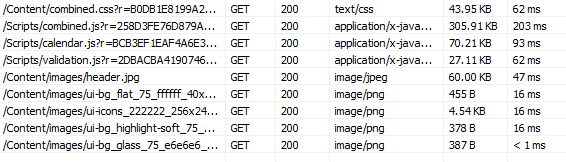
So how is the result - at least for my web application? Here is a screen shot of the payload and timing before caching, or this is the initial load before browser caching takes effect. Totaling 523KB of data for just scripts and image files, taking around 515 ms.

Additional readings:
Topics:
ASP.NET,
MVC,
performance,
web,
WebForm
Monday, March 19, 2012
Session Variable & Performance
When I was trying to boost the performance of our web application, I typically try to focus on the "bottlenecks" and most of the time these are apparent, especially when using profiler tools (EQATEC, MvcMiniProfiler, etc). But one performance bottleneck really stumped me because none of the tools I use are really showing where the problem is.
The setup is like this: the aspx page loads the main page and javascript - which then makes 2 AJAX calls (using jQuery $.get) to some controller actions which both return ascx view which then injected into the aspx. So basically when the site loads, it hits /Home/Index and then within Index (aspx) view, there are several lines of jQuery that make ajax calls (to /Home/PartOne and /Home/PartTwo to populate parts of the page.
Below is a screen shot from MvcMiniProfiler - which shows a different controller name and action from the generic example above, but with a similar problem:

This measurement shows that there is a 510ms delay/bottleneck happening even before the starting of the execution of my controller's action. For the sake of simplicity in investigating this, the action of the controller actually only returns a list of predefined integers. So in theory, this should be fast - like less than 10ms fast, not 510ms.
Here is a screen shot from PageSpeed that shows where the javascript makes 2 consecutive AJAX calls and although both of these return the same list of integer, one is taking 500ms longer:

When I experimentally put "OutputCache" attribute on "PartTwo", it behaves as expected, that it was executing fast. This hints that the problem is not in IIS, but somewhere after that and before it hits my action method.
Here is the code for my controller - which is bare-bone basic and you should not expect problems with it:
Here is my javascript code to load the parts:
My views - index.aspx:
PartOne.ascx:
So everything looks simple and harmless enough - so WHAT IS THE PROBLEM?
The issue is how Session variable is being processed and handled. I posted this problem in StackOverflow and several users suggested to decorate the controller with
I did some more tests and investigation about this issue - like when I remove the usage of Session variables and substituting using Http Cache etc - and as long as there is no reference to Session, everything works fast. Since part of my application relies on Session, it would be too difficult to pull all reference to Session variables out.
Upon more research, readings, testing, etc - what I found is this: Session is thread safe. What this implies is that concurrent client requests is blocking and has to be dealt with synchronously. The 500ms is the preset locking cycle time for Session. Therefore this is why the first request can execute fast and without delay but the second one has 500ms delay. Putting the decoration above allows the controller to do a read-only, hence allowing concurrency for reading. But once there is any attempt to write into the session, the delay will be back.
So here is what my updated controller code looks like:
Additional readings:
-- read more and comment ...
Here is a screen shot from PageSpeed that shows where the javascript makes 2 consecutive AJAX calls and although both of these return the same list of integer, one is taking 500ms longer:

When I experimentally put "OutputCache" attribute on "PartTwo", it behaves as expected, that it was executing fast. This hints that the problem is not in IIS, but somewhere after that and before it hits my action method.
Here is the code for my controller - which is bare-bone basic and you should not expect problems with it:
public class HomeController : Controller {
    public ActionResult Index() {
        return View();
    }

    public ActionResult PartOne() {
        List<int> list = new List<int>() { 1, 2, 3, 4, 5 };
        Session["mylist"] = list;
        return View(list);
    }

    public ActionResult PartTwo() {
        List<int> list = Session["mylist"] as List<int>;
        return View(list);
    }
}
Here is my javascript code to load the parts:
$(document).ready(function () {
    $.ajax({
        url: "/Home/PartOne",
        cache: false,
        success: function (data, textStatus, request) {
            $("#TestContainerOne").html(data);
        }
    });

    $.ajax({
        url: "/Home/PartTwo",
        cache: false,
        success: function (data, textStatus, request) {
            $("#TestContainerTwo").html(data);
        }
    });
});
My views - index.aspx:
<h2>Home page</h2>
<div id="TestContainerOne"></div>
<div id="TestContainerTwo"></div>
PartOne.ascx:
<h2>Part One</h2></pre>PartTwo.ascx:
<h2>Part Two</h2></pre>
So everything looks simple and harmless enough - so WHAT IS THE PROBLEM?
The issue is how Session variable is being processed and handled. I posted this problem in StackOverflow and several users suggested to decorate the controller with
[SessionState(System.Web.SessionState.SessionStateBehavior.ReadOnly)]... and it worked like a charm.
I did some more tests and investigation about this issue - like when I remove the usage of Session variables and substituting using Http Cache etc - and as long as there is no reference to Session, everything works fast. Since part of my application relies on Session, it would be too difficult to pull all reference to Session variables out.
Upon more research, readings, testing, etc - what I found is this: Session is thread safe. What this implies is that concurrent client requests is blocking and has to be dealt with synchronously. The 500ms is the preset locking cycle time for Session. Therefore this is why the first request can execute fast and without delay but the second one has 500ms delay. Putting the decoration above allows the controller to do a read-only, hence allowing concurrency for reading. But once there is any attempt to write into the session, the delay will be back.
So here is what my updated controller code looks like:
[SessionState(System.Web.SessionState.SessionStateBehavior.ReadOnly)]
public class HomeController : Controller {
    public ActionResult Index() {
        return View();
    }

    public ActionResult PartOne() {
        List<int> list = new List<int>() { 1, 2, 3, 4, 5 };
        HttpContext.Cache.Insert("mylist", list, null, DateTime.Now.AddSeconds(10), TimeSpan.Zero);
        return View(list);
    }

    public ActionResult PartTwo() {
        List<int> list = HttpContext.Cache.Get("mylist") as List<int>;
        return View(list);
    }
}
Additional readings:
Tuesday, December 28, 2010
T-Mobile Customer Experience
One of my personal conviction is generosity. So that conviction, combined with good service (especially paid ones) usually produce a desire to reward the service giver beyond the typical means. I personally don't think this is unique to me - for example in tipping your servers in a restaurant, when you are getting excellent service, some people will give more tip, etc.
In this particular experience, I was getting superb service from T-Mobile and this blog post is a way of rewarding them of their excellent efforts to me as a customer.
-- read more and comment ...
Topics:
contentment,
gadgets,
performance,
review,
technology
Sunday, May 16, 2010
Bundling Javascripts & CSS Files
If you are using jQuery for your site, it is possible that eventually your page header section may look like this:
<link href="stylesheets/ui.all.css" rel="stylesheet" type="text/css" />
<link href="stylesheets/admin.css" rel="stylesheet" type="text/css" />
<link href="stylesheets/maincontent.css" rel="stylesheet" type="text/css" />

<script src="scripts/jquery-latest.min.js" type="text/javascript"></script>
<script src="scripts/ui.core.js" type="text/javascript"></script>
<script src="scripts/mycustom.js" type="text/javascript"></script>
Now in those lines of code, there are 6 requests being made separately to the server and this can become a bottle neck for your site performance. Both YSlow and PageSpeed (read here and here) recommend reducing the number of requests being made as a way to create a high performance site.
Easy, right? Just combine the files with a simple text editor - both javascript files and css files are plain text anyway! Yes - you can do that. But this approach will yield a nightmare-ish maintainability and just plain ugly.
Justin Etheredge made a small framework to precisely do this - he called it Bundler.Framework. You can read his latest blog post about it here and download the code here. It is very simple to use and I have had excellent results with it. The framework itself is pretty self-explanatory and Justin's posts highlight on how to use it pretty well.
Through this post, I just want to highlight some of the small things I have to do to eventually get it working (and it has been working awesomely).
So now, with Bundler, your js and css will be rendered like this:
-- read more and comment ...
Through this post, I just want to highlight some of the small things I have to do to eventually get it working (and it has been working awesomely).
- Add a refence to Bundler.Framework.dll
- For the code to actually create a single js file (or css), you will need to make sure that your site's compilation is configure to NOT debug. You can do this in web.config, or else your js files will just be listed on one by one instead of being combined:
<compilation debug="false" targetFramework="4.0">
- Bundler also provide options to compress your css and also to minify your js with different minifiers.
<% Response.Write( Bundler.Framework.Bundle.Css() .Add("~/stylesheets/ui.all.css") .Add("~/stylesheets/admin.css") .Add("~/stylesheets/maincontent.css") .WithCompressor(Bundler.Framework.Css.Compressors.CssCompressors.YuiCompressor) .RenderOnlyIfOutputFileMissing() .Render("/JJCMS/Content/Stylesheets/combined.css") ); %> <compilation debug="false" targetFramework="4.0"> - Bundler also provide options to only render combined js or css file if the rendered file is non-existent. You use the "RenderOnlyIfOutputFileMissing" option. See code above for example.
So now, with Bundler, your js and css will be rendered like this:
<script type="text/javascript" src="/scripts/combined.js?r=67EFAB2205D48FBBB390A6F11C8A4002E"></script>
<link rel="stylesheet" type="text/css" href="/stylesheets/combined.css?r=A84FC8E0836CD939A781066B0BBDE028" />
Topics:
ASP.NET,
javascript,
MVC,
performance,
web
Subscribe to:
Posts (Atom)


 Posts
Posts

