Showing posts with label MVC. Show all posts

Saturday, February 21, 2015

Using GMail as email service from Azure

Following these posts:

I have successfully setup my Azure hosted ASP.NET MVC project to send email via SendGrid. But, SendGrid is a bit slow, which is irritating when the email is for registration confirmation - which I want to be as fast as possible, so if a user registers, that user will get an email within a minute or faster to confirm his/her email to complete registration. If the use must wait longer than that, chances are that the registration will never be continued and finished. So I wanted to use a faster email service - why not GMail?

Here is the SendGrid code:
        private static async Task SendGridSendAsync(string to, string from, string subject, string body)
        {
            var myMessage = new SendGridMessage();
            myMessage.AddTo(to);
            myMessage.From = new System.Net.Mail.MailAddress(
                                "my.service.email.address@gmail.com", "my.service");
            myMessage.Subject = subject;
            myMessage.Text = body;
            myMessage.Html = body;

            var credentials = new NetworkCredential(
                       "sendGridAccount", "sendGridPassword"
                       );

            // Create a Web transport for sending email.
            var transportWeb = new SendGrid.Web(credentials);

            // Send the email.
            if (transportWeb != null)
            {
                await transportWeb.DeliverAsync(myMessage);
            }
            else
            {
                Trace.TraceError("Failed to create Web transport.");
                await Task.FromResult(0);
            }
        }
Here is the GMail code:
        private static async Task GmailSendAsync(string to, string from, string subject, string body)
        {
            var sentFrom = (string.IsNullOrEmpty(from) ? "my.service.email.address@gmail.com" : "my.service");

            // Configure the client:
            System.Net.Mail.SmtpClient client = new System.Net.Mail.SmtpClient("smtp.gmail.com");

            client.Port = 587;
            client.DeliveryMethod = System.Net.Mail.SmtpDeliveryMethod.Network;
            client.UseDefaultCredentials = false;

            // Creatte the credentials:
            System.Net.NetworkCredential credentials = new NetworkCredential(
                 "gmailAccount", "gmailPassword"
                 );
            client.EnableSsl = true;
            client.Credentials = credentials;

            // Create the message:
            var mail = new System.Net.Mail.MailMessage(sentFrom, to);
            mail.Subject = subject;
            mail.Body = body;

            await client.SendMailAsync(mail);
        }
-- read more and comment ...

Tuesday, October 29, 2013

Custom Textbox Editor Template

ASP.NET MVC's built-in editor template is awesome - by just decorating your model, the Html helper EditorFor knows how to read those attributes and display appropriate html elements and html attributes, including validation, display name, or even using custom templates that we specify through DataType or UIHint attributes.

Now, all my string properties in my models have string length attribute, to prevent truncation when they being saved in the database, or for formatting reason. Now the built-in Html helper EditorFor is not smart enough to translate that StringLength attribute to the actual html attribute of maxlength. Secondly, it is also not smart enough to adjust the width of the textbox based on that StringLength - so a ZipCode property which only need 5 characters should have smaller textbox compared to a CompanyName property which needs 50 characters.

So I made an editor template that do just that. You can copy the code below, put it in a partial view called "string.cshtml" placed within "EditorTemplates" folder under "/Views/Shared/". I use Twitter Bootstrap css to adjust my textbox width (using "input-mini", "input-large" classes) - feel free to substitute them with whatever you are using.
@model String
@using System.Globalization
@using System.Linq
@{
    IEnumerable validators = ModelValidatorProviders.Providers.GetValidators(ViewData.ModelMetadata, ViewContext);
    ModelClientValidationRule stringLengthRule = validators
        .SelectMany(v => v.GetClientValidationRules())
        .FirstOrDefault(m => m.ValidationType == "length");
    if (stringLengthRule != null && stringLengthRule.ValidationParameters.ContainsKey("max"))
    {
        int maxLength = int.Parse(stringLengthRule.ValidationParameters["max"].ToString());
        string inputSize = "input-xxlarge";
        if (maxLength < 5)
        {
            inputSize = "input-mini";
        }
        else if (maxLength < 10)
        {
            inputSize = "input-small";
        }
        else if (maxLength < 30)
        {
            inputSize = "input-medium";
        }
        else if (maxLength < 75)
        {
            inputSize = "input-large";
        }
        else if (maxLength < 150)
        {
            inputSize = "input-xlarge";
        }
        Dictionary attributes = new Dictionary { 
            { "class", inputSize }, 
            { "maxlength", maxLength.ToString(CultureInfo.InvariantCulture) } 
        };
        @Html.TextBox("", Model, attributes)
    }
    else
    {
        Dictionary attributes = new Dictionary { 
            { "class", "input-medium" } 
        };
        @Html.TextBox("", Model, attributes)
    }
}

-- read more and comment ...

Wednesday, April 10, 2013

Handling 404 Error in ASP.NET MVC

In ASP.NET Web Forms, handling 404 errors are easy - which is basically a web.config setting. In ASP.NET MVC, it is a bit more complicated. Why is it more complicated? In comparison, everything is seemingly easier in MVC than WebForm.

It is more complicated mainly because of Routing. In WebForm, most 404 occurs because of non-existent file and each UR: is usually mapped to a particular file (aspx). With MVC, that is not the case. All requests are handled by the Routing table and based on that it will invoke appropriate controller and actions etc. Secondly, our basic default route usually is quite common ({controller}/{action}/{id}) - therefore most URL request will be caught by this route.

So, let's dive in on how can we do proper handling of 404 errors with ASP.NET MVC.

TURN ON CUSTOM ERROR IN WEB.CONFIG

    <customErrors mode="On" defaultRedirect="~/Error/Error">
      <error statusCode="404" redirect="~/Error/Http404" />
    </customErrors>

DECLARE  DETAIL ROUTES MAPPED IN ROUTE TABLE

So instead of just using the default route:
   routes.MapRoute(
      name: "Default",
      url: "{controller}/{action}/{id}",
      defaults: new { controller = "Home", action = "Index", id = UrlParameter.Optional }
   );
Declare all your intended route explicitly and create a "catch-all" to handle non-matching route - which basically a 404. In MVC, a 404 can happen when you try to access a URL where the there is no controller for. This code in the routing table handles that scenario.
   routes.MapRoute(
      name: "Account",
      url: "Account/{action}/{id}",
      defaults: new { controller = "Account", action = "Index", id = UrlParameter.Optional }
   );

   routes.MapRoute(
      name: "Home",
      url: "Home/{action}/{id}",
      defaults: new { controller = "Home", action = "Index", id = UrlParameter.Optional }
   );

   routes.MapRoute(
      name: "Admin",
      url: "Admin/{action}/{id}",
      defaults: new { controller = "Admin", action = "Index", id = UrlParameter.Optional }
   );

   routes.MapRoute(
      name: "404-PageNotFound",
      url: "{*url}",
      defaults: new { controller = "Home", action = "Http404" }
   );

OVERRIDE HANDLEUNKNOWNACTION IN BASECONTROLLER CLASS

Create a Controller base class that every controller in your application inherits from. In that base controller class, override HandleUnknownAction method. Now, another scenario that a 404 may happen is that when the controller exists, but there is no action for it. In this case, the routing table will not be able to trap it easily - but the controller class has a method that handle that.
    [AllowAnonymous]
    public class ErrorController : Controller
    {
        protected override void HandleUnknownAction(string actionName)
        {
            if (this.GetType() != typeof(ErrorController))
            {
                var errorRoute = new RouteData();
                errorRoute.Values.Add("controller", "Error");
                errorRoute.Values.Add("action", "Http404");
                errorRoute.Values.Add("url", HttpContext.Request.Url.OriginalString);
 
                View("Http404").ExecuteResult(this.ControllerContext);
            }
        }
 
        public ActionResult Http404()
        {
            return View();
        }
 
        public ActionResult Error()
        {
            return View();
        }
    }

CREATE CORRESPONDING VIEWS

View for generic error: Error.chtml
@model System.Web.Mvc.HandleErrorInfo
 
@{
    ViewBag.Title = "Error";
}
 
<hgroup class="title">
    <h1 class="error">Error.</h1>
    <br />
    <h2 class="error">An error occurred while processing your request.</h2>
    @if (Request.IsLocal)
    {
        <p>
            @Model.Exception.StackTrace
        </p>
    }
    else
    {
        <h3>@Model.Exception.Message</h3>
    }
</hgroup>
View for 404 error: Http404.chtml
@model System.Web.Mvc.HandleErrorInfo
 
@{
    ViewBag.Title = "404 Error: Page Not Found";
}
<hgroup class="title">
    <h1 class="error">We Couldn't Find Your Page! (404 Error)</h1><br />
    <h2 class="error">Unfortunately, the page you've requested cannot be displayed. </h2><br />
    <h2>It appears that you've lost your way either through an outdated link <br />or a typo on the page you were trying to reach.</h2>    
</hgroup>
-- read more and comment ...

Sunday, April 7, 2013

Properly Deleting Database for Database-Migration

I am working on a simple brand new project with ASP.NET MVC and decided to try EF to connect to my database. This gives me the opportunity to learn EF Code-First, database-migration, etc.

Everything seems to be pretty intuitive until when I am running "update-database" from the Package Manager Console. I created my Configuration class, turn-on automatic migration, and populated my database using Seed method, made sure all my context are correct.

[TL;DR]

When one need to delete/recreate a database, do not delete the mdf file from App_Data, but instead go to "SQL Server Object Explorer" and find your database under (localdb) and delete it from there.

FULL VERSION:


Then, since I want to recreate my database, I delete my database (mdf file) from my App_Data folder under Solution Explorer and then run "update-database". See picture on the left.

But then I am getting an error:
Cannot attach the file D:\Projects\MvcApplication1\App_Data\aspnet-MvcApplication1-20130407085115.mdf' as database 'MvcApplication1'.
I looked in the file explorer and the mdf file is surely gone. Try to close Visual Studio and reopen, same error.

Well, the database was initially created when I try to "Register" or create an account using the site (it's using SimpleMembershipProvider) - so maybe it will recreate it if I simply run the site and try to register again. But then I am getting the same error when running the website.

I went to the recycle bin, restore the mdf file and ran the project again - it worked. It did not have the new tables or new data, but no "cannot attach" error. Restoring this file also restore my default connection. If I try to delete the mdf file again, then my project won't run and my database-migration also won't run.

I almost resort to think that "Code-First" is a lie - that I simply have to add the new tables manually in the SQL table designer, etc. This is so confusing - should not be that hard, I think.

So with the mdf file deleted, I went to Server Explorer and checked that my connection to the database is gone - there is nothing under "Data Connections".

So maybe I need to delete the data connection instead of deleting the mdf file from App_Data? So I did a restore again from my Recycle Bin, made sure my project ran, and then I deleted my connection from the Server Explorer, rebuilt the project and ran it. It worked! But my delight is short-lived, since then I realized that deleting the connection does not necessarily mean deleting the database - which I quickly checked that my mdf file still in the App_Data folder. I simply deleted the connection to view the database via Visual Studio.

I tried more and more things - which increase the frustration level - because at this point I am stuck in my project and all I have been trying to do is to modify my database schema. If I did this using the old way using SQL Management Studio or SQL Express, or even Linq-to-SQL, I could have been making a huge progress in my project.

SOLUTION

Until I stumbled on "SQL Server Object Explorer" under "VIEW" in your VS Studio 2012 top menu/toolbar. I noticed that although my mdf file is deleted from my App_Data folder, but under "SQL Server Object Explorer", my database is still registered under (localdb)\v11.0\Databases.

Out of curiosity, I deleted my database from there and re-ran my project - it worked. It recreated my database (without the new tables and seed data). So I deleted it again from SQL Object Explorer, and ran "update-database" - it ran successfully this time. EUREKA!!

So lesson learned: when one need to delete/recreate a database, do not delete the mdf file from App_Data, but instead go to "SQL Server Object Explorer" and find your database under (localdb) and delete it from there.

-- read more and comment ...

Monday, April 1, 2013

Crumbtrail ActionFilter

Recently, I had to make a crumb-trail in the web application that I am working on (ASP.NET MVC). There are multiple ways of doing this and initially I elected to do this in my controller base class (which is inherited by all my controller classes). I created a method that do the job - but this means that this method has to be called on every single action (with GET method). If a fellow developer miss to call the method, then it would mean that the data in the crumb-trail is not built properly or accurately. If there is just an interceptor that I can hook into that will run automatically every time a controller action is being called ... *sigh

Wait - there is one, ActionFilter!!

So I created an action filter and via configuration register and apply it to all controllers. The logic in my code handles the exceptions to the apply all (such as Account controller, POST method, and non-authenticated users). Here is the code to the ActionFilter code:
    public class CrumbTrailKeyValuePair<TKey, TValue>
    {
        public CrumbTrailKeyValuePair() { }
        public CrumbTrailKeyValuePair(TKey key, TValue value)
        {
            Key = key;
            Value = value;
        }
        public TKey Key { get; set; }
        public TValue Value { get; set; }
    }

    public class CrumbTrailAttribute : ActionFilterAttribute
    {
        public override void OnResultExecuting(ResultExecutingContext filterContext)
        {
            if (filterContext.HttpContext.User.Identity.IsAuthenticated)
            {
                // skip recording Account controller actions
                if (filterContext.RouteData.Values["controller"] != null && 
                    filterContext.RouteData.Values["controller"].ToString() != "Account")
                {
                    // put in cookies
                    Queue<CrumbTrailKeyValuePair<string, string>> crumbTrailQueue = 
                       new Queue<CrumbTrailKeyValuePair<string, string>>();
                    HttpCookie crumbTrailCookie = 
                       filterContext.HttpContext.Request.Cookies["CrumbTrailLinks"] ?? new HttpCookie("CrumbTrailLinks");
 
                    // initialize serializer
                    var serializer = new JavaScriptSerializer();
 
                    // if crumbTrailCookie is not empty, retrieve value from cookie the rehydrate queue
                    if (crumbTrailCookie != null && !string.IsNullOrEmpty(crumbTrailCookie.Value))
                    {
                        // rehydrate crumbTrailQueue with cookie value         
                        crumbTrailQueue = 
                           new Queue<CrumbTrailKeyValuePair<string, string>>
                              (serializer.Deserialize<IEnumerable<CrumbTrailKeyValuePair<string, string>>>
                                 (HttpUtility.UrlDecode(crumbTrailCookie.Value)));
                    }
 
                    if (filterContext.HttpContext.Request.HttpMethod.ToUpper() == "GET")
                    {
                        // get page title
                        var pageTitle = string.IsNullOrEmpty(filterContext.Controller.ViewBag.Title) ? 
                           "PAGE" : filterContext.Controller.ViewBag.Title;
 
                        // get url
                        string url = filterContext.HttpContext.Request.RawUrl;
 
                        // if current page is not in both queue, then add it
                        if (!crumbTrailQueue.Any(x => x.Value == url && x.Key == pageTitle))
                        {
                            // remove oldest menu item, keep queue length to 6
                            if (crumbTrailQueue.Count >= 5)
                                crumbTrailQueue.Dequeue();
 
                            // insert new menu item into queue
                            crumbTrailQueue.Enqueue(new CrumbTrailKeyValuePair<string, string>(pageTitle, url));
                        }
 
                        crumbTrailCookie.Value = serializer.Serialize(crumbTrailQueue);
                        crumbTrailCookie.Expires = DateTime.Now.AddDays(365);
                        crumbTrailCookie.Path = "/";
                        filterContext.HttpContext.Response.Cookies.Add(crumbTrailCookie);
                    }
 
                    // put in viewbag
                    if (filterContext.Result.GetType().Name == "ViewResult")
                    {
                        (filterContext.Result as ViewResult).ViewBag.QuickAccessQueue = crumbTrailQueue;
                    }
                }
            }
        }
    }
Inside the view, just get the queue from the ViewBag and display accordingly. The queue is stored temporarily in a cookie, so it will be remembered even when the browser is closed and reopen and relogin.
-- read more and comment ...

Monday, March 25, 2013

Creating Validation Adapter for Validation Attribute

If your project is rather big, often you would like your validation to reside on the business layer instead of on the UI layer. So for example, using our previous code sample, it would make perfect sense if the custom attribute code resides in your business layer project (instead of on the UI project). BUT, to enable client validation (here for example), implementing IClientValidatable is required and IClientValidatable is within the System.Web.Mvc namespace. This means that your business layer needs to reference System.Web.Mvc. But why would you want to do that - referencing a UI related reference in your business layer project?

When we look at the built-in validator (such as RequiredAttribute), how did they do this? If we look at the documentation, it is within System.ComponentModel.DataAnnotations.ValidationAttribute namespace and deriving from System.Object - there is no dependency to System.Web.Mvc at all. We can use that validation attribute in WinForm, Silverlight, WebForm, WPF, etc.


There is no magic - the ASP.NET guys simply built a validation adapter for it in the System.Web.Mvc namespace. In this post, I am going to show you how to build one for our MagicNumber validator.

So let's clarify on our namespacing issue - in our business layer, let's call that MyApp.Library project (namespace: MyApp.Library), which includes MyClass.cs (namespace: MyApp.Library or MyApp.Library.MyClass to be complete) and our custom validation attribute MagicNumberAttribute.cs (namespace: MyApp.Library or MyApp.Library.MagicNumberAttribute to be complete).

Here is the code for MyApp class:
   public class MyClass {
      // ... more code
      [MagicNumber(ErrorMessage = "Sum is not correct")]
      public int MyData { get; set; }
      // ... more code
   }
Here is our code for the custom validation attribute in MagicNumberAttribute.cs:
[AttributeUsage(AttributeTargets.Property | AttributeTargets.Field, AllowMultiple = false)]
sealed public class MagicNumberAttribute : ValidationAttribute {
   // constructor to accept the comparison property name
   public MagicNumberAttribute(string thirtySevenProperty) : base() {
      if (thirtySevenProperty == null) {
         throw new ArgumentNullException("thirtySevenProperty");
      }
      ThirtySevenProperty= thirtySevenProperty;
   }

   // property to store the comparison field name
   public string ThirtySevenProperty{ get; private set; }

   protected override ValidationResult IsValid(object value, ValidationContext validationContext) {
      // get property info of the "ThirtySevenProperty"
      PropertyInfo thirtySevenPropertyInfo = validationContext.ObjectType.GetProperty(ThirtySevenProperty);

      // check if that property exists / valid
      if (thirtySevenPropertyInfo == null) {
         return new ValidationResult(String.Format(CultureInfo.CurrentCulture, "UNKNOWN PROPERTY", ThirtySevenProperty));
      }

      // get the value of the property
      object thirtySevenPropertyValue = thirtySevenPropertyInfo.GetValue(validationContext.ObjectInstance, null);

      // do comparison and return validation result with error if not equal
      if (!Equals(value, thirtySevenPropertyValue)) {
         return new ValidationResult(FormatErrorMessage(validationContext.DisplayName));
      }

      // return null if everything is ok
      return null;
   }
}
We'll call our ASP.NET MVC project to be MyApp.UI.Mvc (namespace: MyApp.UI.Mvc). Here is our javascript from the previous post, we'll reuse it, put it in a js file:
   jQuery.validator.unobtrusive.adapters.addSingleVal("magicnumber", "other");

   jQuery.validator.addMethod("magicnumber", function (val, element, other) {
      var modelPrefix = element.name.substr(0, element.name.lastIndexOf(".") + 1)
      var otherVal = $("[name=" + modelPrefix + other + "]").val();
      if (val && otherVal) {
        return val == otherVal;
      }
      return true;
   );
So now, instead of implementing IClientValidatable, we will be creating a validation adapter. We will put this in a file in our MyApp.UI.Mvc project, let's name it "MagicNumberAttributeAdapter.cs". The code is simple:
public class MagicNumberAttributeAdapter : DataAnnotationsModelValidator
{
   public MagicNumberAttributeAdapter(ModelMetadata metadata, ControllerContext context, MagicNumberAttribute attribute)
       : base(metadata, context, attribute)
   {
   }

   public override IEnumerable GetClientValidationRules()
   {
      var rule = new ModelClientValidationRule
      {
          ErrorMessage = this.ErrorMessage,
          ValidationType = "magicnumber",
      };
      rule.ValidationParameters.Add("other", this.Attribute.ThirtySevenProperty);
      yield return rule;
   }
}
To make the connection between the adapter and the validation attribute itself, we need to let MVC know about it - so we need to register it inside the global.asax.cs file:
DataAnnotationsModelValidatorProvider.RegisterAdapter(typeof(MagicNumberAttribute), typeof(MagicNumberAttributeAdapter));
Once all those are setup, our custom validator will fire on the client-side (as well as server-side), we have clear separation of concern - where the business layer does not reference the UI as dependency, and our custom validation attribute is also reusable. Awesome!

Additional reading:
-- read more and comment ...

Sunday, March 17, 2013

Custom Validation Attribute - Client Side Enabled With Custom Rule

In the previous post, I went over on how to enable client-side validation for our custom validation attribute - using a pre-build jQuery validator. Now what if you want to create your own custom script - because your validator needs to do something truly custom that the pre-build validator is not covering? No problem!

Modify your code to this:
[AttributeUsage(AttributeTargets.Property | AttributeTargets.Field, AllowMultiple = false)]
sealed public class MagicNumberAttribute : ValidationAttribute, IClientValidatable {
   // constructor to accept the comparison property name
   public MagicNumberAttribute(string thirtySevenProperty) : base() {
      if (thirtySevenProperty == null) {
         throw new ArgumentNullException("thirtySevenProperty");
      }
      ThirtySevenProperty= thirtySevenProperty;
   }

   // property to store the comparison field name
   public string ThirtySevenProperty{ get; private set; }

   protected override ValidationResult IsValid(object value, ValidationContext validationContext) {
      // get property info of the "ThirtySevenProperty"
      PropertyInfo thirtySevenPropertyInfo = validationContext.ObjectType.GetProperty(ThirtySevenProperty);

      // check if that property exists / valid
      if (thirtySevenPropertyInfo == null) {
         return new ValidationResult(
            String.Format(CultureInfo.CurrentCulture, "UNKNOWN PROPERTY", ThirtySevenProperty));
      }

      // get the value of the property
      object thirtySevenPropertyValue = thirtySevenPropertyInfo.GetValue(validationContext.ObjectInstance, null);

      // do comparison and return validation result with error if not equal
      if (!Equals(value, thirtySevenPropertyValue)) {
         return new ValidationResult(FormatErrorMessage(validationContext.DisplayName));
      }

      // return null if everything is ok
      return null;
   }

   public IEnumerable<ModelClientValidationRule> GetClientValidationRules(
      ModelMetadata metadata, ControllerContext context) {
      var rule = new ModelClientValidationRule
      {
          ErrorMessage = this.ErrorMessage,
          ValidationType = "magicnumber",
      };
      rule.ValidationParameters.Add("other", OtherProperty);
      yield return rule;
   }
}
As we see, in "GetClientValidationRules", I am returning a "ModelClientValidationRule" with "ValidationType" set to "magicnumber". This string is the javascript method name. The name itself is not important, but they need to be consistent between what you put here and the actual method name in the javascript method itself. I am also adding parameters into it - which then will be transformed into a name-value pair that can be retrieved in our javascript method.

Now create a javascript file to be included in your project (it must be referenced AFTER the basic jquery.js and jquery.validate.js and jquery.validaten.unobstrusive.js).
   jQuery.validator.unobtrusive.adapters.addSingleVal("magicnumber", "other");

   jQuery.validator.addMethod("magicnumber", function (val, element, other) {
      var modelPrefix = element.name.substr(0, element.name.lastIndexOf(".") + 1)
      var otherVal = $("[name=" + modelPrefix + other + "]").val();
      if (val && otherVal) {
        return val == otherVal;
      }
      return true;
   );
The first line is to connect our javascript method "magicnumber" into the validation event and the rest is our client-side script to do client side validation. Our "magicnumber" method takes in "other" parameter, which will hold the value for the name for our comparison property/field - we need that to get the value of the field. We also want to consider if our model is using prefix - beyond that it is just doing a dom selector and get the value and returning a comparison result.

Additional reading:
-- read more and comment ...

Tuesday, March 12, 2013

Custom Validation Attribute - Client Side Enabled!

In previous posts, I outlined how to make a custom validation attribute - including a more complex one that depends on another property. Both of those validators are working - but they are working on the server-side. So if you have an ASP.NET MVC web application, the validation will fire after it gets to the server side within your controller. Ideally, we want to do client-side validation as well - so that the form does not need to POST if the data is not valid. How do we do that?

We can make custom javascript, query the fields manually and check for conditions - but this code will be disconnected from the custom validator that we created. Doing custom javascript also means that it will be so specific that the likelihood of being reusable is very very small.

Also, as we have seen with the built-in validators that shipped with ASP.NET MVC, they seem to just work - no custom javascript needed per field or manual client-side validation. When a property or a field is decorated with the correct attribute and client-side validation is enabled in the web.config, then boom - it just works. How can we make our validator to behave in similar manner?


One way to do this is by implementing IClientValidatable in your custom validator. Implementing this interface means we must implement a method called "GetClientValidationRules". This method is what basically will become a connector for our validator to the client-side. The property decorated with our custom validation attribute will then outputting flags that will indicate that it should be evaluated during client-side validation. In this method as well we need to provide additional information to properly evaluate the validity of the property on the client-side - mostly a (javascript) method name to be called during validation and some parameters needed to evaluate property within that method. When we do this, this is the updated validator class will look like:
[AttributeUsage(AttributeTargets.Property | AttributeTargets.Field, AllowMultiple = false)]
sealed public class MagicNumberAttribute : ValidationAttribute, IClientValidatable {
   // constructor to accept the comparison property name
   public MagicNumberAttribute(string thirtySevenProperty) : base() {
      if (thirtySevenProperty == null) {
         throw new ArgumentNullException("thirtySevenProperty");
      }
      ThirtySevenProperty= thirtySevenProperty;
   }

   // property to store the comparison field name
   public string ThirtySevenProperty{ get; private set; }

   protected override ValidationResult IsValid(object value, ValidationContext validationContext) {
      // get property info of the "ThirtySevenProperty"
      PropertyInfo thirtySevenPropertyInfo = validationContext.ObjectType.GetProperty(ThirtySevenProperty);

      // check if that property exists / valid
      if (thirtySevenPropertyInfo == null) {
         return new ValidationResult(String.Format(CultureInfo.CurrentCulture, "UNKNOWN PROPERTY", ThirtySevenProperty));
      }

      // get the value of the property
      object thirtySevenPropertyValue = thirtySevenPropertyInfo.GetValue(validationContext.ObjectInstance, null);

      // do comparison and return validation result with error if not equal
      if (!Equals(value, thirtySevenPropertyValue)) {
         return new ValidationResult(FormatErrorMessage(validationContext.DisplayName));
      }

      // return null if everything is ok
      return null;
   }

   public IEnumerable<ModelClientValidationRule$gt; GetClientValidationRules(ModelMetadata metadata, ControllerContext context) {
      yield return new ModelClientValidationEqualToRule(this.ErrorMessage, OtherProperty);        
   }
}
In the code above, I am reusing an existing validation rule "ModelClientValidationEqualToRule" which will connect with "equalto" jQuery client-validator. This is a pre-existing rule, so at this point, we can just run this and it should work - no more code needed.

In the next post, I will go over on how to return our own custom ModelClientValidationRule and how to create a corresponding javascript client-side validator.

Additional reading:
-- read more and comment ...

Sunday, April 8, 2012

Boost Performance Using Caching

Caching is widely used for static files (like javascript files, css, etc). All browser support client-side caching for these static files. IIS also supports server-side caching. Caching done right can tremendously improve web application serving performance exponentially.

Let's consider this scenario. You have a static html page - let's say this page: http://www.google.com/intl/en/about/index.html. The payload of this page is about 9k bytes. Although it is very small, but payload is still payload. If nothing is cache, every time we go to that page, our browser have to download 9k bytes of data. Now we turn on browser caching, the first time we go to that page, we will download the full 9k bytes of data. But the subsequent visit to that page will load from browser cache. Look at the comparison of network traffic below (the top is the first visit and the below image is the subsequent visit):


The http status code "200" means successful retrieval from the web server and "304" means that content has not been modified therefore doing retrieval from local browser cache. As we see, the data transmitted through the internet or network was 40 times smaller (218B vs 9.5KB) and the time taken is also 5 times faster (47ms vs 203ms) on the subsequent visit. This performance boost is caused by browser caching. Now imagine if we do this to a more complicated page, with all the css files, javascript files, and more images - the performance gain can be quite significant.

There is also a different type of caching called data caching (which I used in application in this blog post about Session variable performance) - which basically means that the application is storing the data retrieved temporarily in memory instead of doing a data retrieval from the database. The benefit of this type of caching is that retrieval from memory is much faster compared to database query/retrieval.

In this post, I will focus on the browser caching and write about data caching in the future post.

Browser caching is actually pretty easy. In short, you need add an "expire" header. The header makes these parts of the website to be cacheable in the client browsers. I usually set an expiration for 30 days after the components were first cache. This means that the first time that component is downloaded into the client browser, it will store itself in the browser cache and reuse it again and again when needed until 30 days have elapsed. On the 31st day, it will discard the cached version and retrieve a new one from the server.

In .NET development, you can set this expiration in a couple ways - by code or via IIS. Both of these approaches will actually do the same thing in the end, so it does not really matter that much, but it's good to know.

If you want to do this by code, put a web.config file in the folder of static files you want to cache. For example, if you have an "images" folder, or "scripts" folder - put this web.config file in that folder. In the screen shot, I have a "Contents" folder, where all my images and css files. Then inside the web.config file, I set the clientCache element with my expiration values.
<?xml version="1.0" encoding="UTF-8"?>
<configuration>
    <system.webServer>
        <staticContent>
            <clientCache 
                cacheControlMode="UseMaxAge" 
                cacheControlMaxAge="30.00:00:00" />
        </staticContent>
    </system.webServer>
</configuration>

If you want to it via IIS, open the website folder that you want to apply and click or highlight the folder of the files that you want to be cached. I am using the same folder as above - the "contents" folder.

Then open/double-click the "HTTP Response Header" feature.

Then click "Set Common Headers..." on the right pane.

This will launch "Set Common HTTP Response Headers" window and you can set the expiration values within this window. Once you hit "OK", what IIS will do is create a web.config file for you - creating the a similar result as the code/manual approach above.

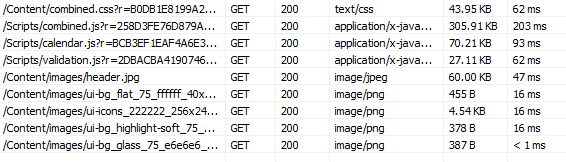
So how is the result - at least for my web application? Here is a screen shot of the payload and timing before caching, or this is the initial load before browser caching takes effect. Totaling 523KB of data for just scripts and image files, taking around 515 ms.
Now, here is the result on the subsequent request, with the caching applied. Totaling 1.8KB of data, taking around 37ms.
So in the end, the payload is 20X smaller and the time is about 14X faster. Quite a big pay off for a small change. Half a second may not seem much, but it does bring a lot of user satisfaction when their experience in using your web application is seamless and without delay. Jeff Atwood wrote excellently in his blog post: Performance is a Feature.

Additional readings:
-- read more and comment ...

Monday, March 19, 2012

Session Variable & Performance

When I was trying to boost the performance of our web application, I typically try to focus on the "bottlenecks" and most of the time these are apparent, especially when using profiler tools (EQATEC, MvcMiniProfiler, etc). But one performance bottleneck really stumped me because none of the tools I use are really showing where the problem is.

The setup is like this: the aspx page loads the main page and javascript - which then makes 2 AJAX calls (using jQuery $.get) to some controller actions which both return ascx view which then injected into the aspx. So basically when the site loads, it hits /Home/Index and then within Index (aspx) view, there are several lines of jQuery that make ajax calls (to /Home/PartOne and /Home/PartTwo to populate parts of the page.

Below is a screen shot from MvcMiniProfiler - which shows a different controller name and action from the generic example above, but with a similar problem:


This measurement shows that there is a 510ms delay/bottleneck happening even before the starting of the execution of my controller's action. For the sake of simplicity in investigating this, the action of the controller actually only returns a list of predefined integers. So in theory, this should be fast - like less than 10ms fast, not 510ms.

Here is a screen shot from PageSpeed that shows where the javascript makes 2 consecutive AJAX calls and although both of these return the same list of integer, one is taking 500ms longer:

When I experimentally put "OutputCache" attribute on "PartTwo", it behaves as expected, that it was executing fast. This hints that the problem is not in IIS, but somewhere after that and before it hits my action method.

Here is the code for my controller - which is bare-bone basic and you should not expect problems with it:
public class HomeController : Controller {
    public ActionResult Index() {
        return View();
    }

    public ActionResult PartOne() {
        List<int> list = new List<int>() { 1, 2, 3, 4, 5 };
        Session["mylist"] = list;
        return View(list);
    }

    public ActionResult PartTwo() {
        List<int> list = Session["mylist"] as List<int>;
        return View(list);
    }
}

Here is my javascript code to load the parts:
$(document).ready(function () {
    $.ajax({
        url: "/Home/PartOne",
        cache: false,
        success: function (data, textStatus, request) {
            $("#TestContainerOne").html(data);
        }
    });

    $.ajax({
        url: "/Home/PartTwo",
        cache: false,
        success: function (data, textStatus, request) {
            $("#TestContainerTwo").html(data);
        }
    });
});

My views - index.aspx:
<h2>Home page</h2>
<div id="TestContainerOne"></div>
<div id="TestContainerTwo"></div>

PartOne.ascx:
<h2>Part One</h2></pre>
PartTwo.ascx:
<h2>Part Two</h2></pre>

So everything looks simple and harmless enough - so WHAT IS THE PROBLEM?

The issue is how Session variable is being processed and handled. I posted this problem in StackOverflow and several users suggested to decorate the controller with
[SessionState(System.Web.SessionState.SessionStateBehavior.ReadOnly)]
... and it worked like a charm.

I did some more tests and investigation about this issue - like when I remove the usage of Session variables and substituting using Http Cache etc - and as long as there is no reference to Session, everything works fast. Since part of my application relies on Session, it would be too difficult to pull all reference to Session variables out.

Upon more research, readings, testing, etc - what I found is this: Session is thread safe. What this implies is that concurrent client requests is blocking and has to be dealt with synchronously. The 500ms is the preset locking cycle time for Session. Therefore this is why the first request can execute fast and without delay but the second one has 500ms delay. Putting the decoration above allows the controller to do a read-only, hence allowing concurrency for reading. But once there is any attempt to write into the session, the delay will be back.

So here is what my updated controller code looks like:
[SessionState(System.Web.SessionState.SessionStateBehavior.ReadOnly)]
public class HomeController : Controller {
    public ActionResult Index() {
        return View();
    }

    public ActionResult PartOne() {
        List<int> list = new List<int>() { 1, 2, 3, 4, 5 };
        HttpContext.Cache.Insert("mylist", list, null, DateTime.Now.AddSeconds(10), TimeSpan.Zero);
        return View(list);
    }

    public ActionResult PartTwo() {
        List<int> list = HttpContext.Cache.Get("mylist") as List<int>;
        return View(list);
    }
}

Additional readings:
-- read more and comment ...

Tuesday, April 19, 2011

Client-Side Validation with AJAX/Dynamic Form

One of the thing in my to-do list for MVC is "figure out how to do client-side validation". Isn't that supplied out of the box since like ASP.NET MVC 2? Yes, it is - but it only work out of the box if the form is not dynamically fetched.

In my projects, most of the form is a dynamic form - so user click an icon and then the form (empty or pre-filled) is fetched via AJAX and then displayed (some times in a jQuery dialog). This is a quite common scenario, for example: you are looking at your account profile screen and displayed there is a list of your phone numbers that you have registered. Let's say you then want to edit one of those since you changed your phone number. So you click the edit button/icon next to your phone number on the screen and a dialog box pops with the old phone number, you edit it, click "Save" and the list refreshes with your phone number.

To simply enforcing a "required" field validation in this scenario was quite complicated. Especially when your AJAX submit handler is a custom handler (instead of using the stock ASP.NET MVC AJAX Helper). But now, by adding less than 10 lines of code, add 2 lines of configuration settings in the web.config and including less than 3 javascripts - it is all possible!

-- read more and comment ...

Tuesday, March 29, 2011

jQuery update for IE9

When Internet Explorer was released, I downloaded it immediately and replaced my IE8. It works superbly except on a project that I was working on. For some reason, some javascripts are causing errors and won't work. I was using jQuery 1.4.x and jQuery UI 1.8.1.

After some investigation, the existence of the meta-tag to force IE compatibility and the outdated jQuery scripts were causing all the errors.

So I removed the meta-tag ("<meta http-equiv="x-ua-compatible" content="IE=8" />") and updated the jQuery reference to the latest greatest (1.5.1 and UI 1.8.11) - and all are happy again.

-- read more and comment ...

Wednesday, March 2, 2011

Integrating ELMAH into your ASP.NET MVC project

What is ELMAH? ELMAH stands for Error Logging Modules and Handlers. So it does what it says, logging errors. It's a plug-able stand alone module that you can integrate with your project quite easily.

From ELMAH's site:
Once ELMAH has been dropped into a running web application and configured appropriately, you get the following facilities without changing a single line of your code:

  • Logging of nearly all unhandled exceptions.
  • A web page to remotely view the entire log of recoded exceptions.
  • A web page to remotely view the full details of any one logged exception.
  • In many cases, you can review the original yellow screen of death that ASP.NET generated for a given exception, even with customErrors mode turned off.
  • An e-mail notification of each error at the time it occurs.
  • An RSS feed of the last 15 errors from the log. 
Sounds awesome! Hell yes - beats writing your own any day! How do you integrate it with ASP.NET MVC project?

1. Download ELMAH
You can get the compiled assemblies or the source files here: http://code.google.com/p/elmah/

2. Reference ELMAH's assemblies
If you get the compiled assemblies, just make a reference to Elmah.dll. If you get the source, you will need to build it and then reference it (either by project or by binary).

3. Modify web.config
Open your web.config and make these changes:
a. Add this "configSections" within "configuration"
<configSections>
        <sectionGroup name="elmah">
            <section name="security" requirePermission="false" type="Elmah.SecuritySectionHandler, Elmah"/>
            <section name="errorLog" requirePermission="false" type="Elmah.ErrorLogSectionHandler, Elmah"/>
            <section name="errorMail" requirePermission="false" type="Elmah.ErrorMailSectionHandler, Elmah"/>
            <section name="errorFilter" requirePermission="false" type="Elmah.ErrorFilterSectionHandler, Elmah"/>
        </sectionGroup>
    </configSections>
b. Add this "elmah" section within "configuration" under the "configSections". This will enable ELMAH to save the error log to the database using "MyAppConnectionString" connection string. If you want to save the log into XML files on a local disk, you can uncomment the second line (and comment the 4th line) and specify the saving location under "logPath".
<elmah>
        <!--<errorLog type="Elmah.XmlFileErrorLog, Elmah" logPath="~/App_Data"/>-->
        <security allowRemoteAccess="1"/>
        <errorLog type="Elmah.SqlErrorLog, Elmah" connectionStringName="MyAppConnectionString"/>
    </elmah>
c. Within "system.web" section, add these lines:
<httpHandlers>
            <add verb="POST,GET,HEAD" path="elmah.axd" type="Elmah.ErrorLogPageFactory, Elmah"/>
        </httpHandlers>
        <httpModules>
            <add name="ErrorLog" type="Elmah.ErrorLogModule, Elmah"/>
        </httpModules>
d. Within "configuration", configure the permission to see the log. Basically it will deny all users unless users are logged in and user name is listed in the "allow" list. Enable that by adding these lines:
<location path="elmah.axd">
        <system.web>
            <authorization>
                <allow users="admin,joe,bob"/>
                <deny users="*"/>
            </authorization>
        </system.web>
    </location>

4. Modify global.asax
Check in your global.asax whether this line exists:
routes.IgnoreRoute("{resource}.axd/{*pathInfo}");
If it is, then no more changes are needed in the global.asax.

5. Preparing Database
If you elect to store the log in the database, then some tables and stored procedures must be created before ELMAH can be functional. Get the script to create all those tables & stored procedures here: http://code.google.com/p/elmah/wiki/Downloads?tm=2 and run it.

That should be it and ELMAH is ready to run - you can start accessing ELMAH under /elmah.axd from your root url.

But I went a step further - I want all exception, including handled one to also be captured in ELMAH. ASP.NET MVC provides an filter-attribute called "HandleError" to handle/catch all errors/exceptions happening in the controller or bubble all the way to the controller. So instead of using that, I made my own HandleError attribute that will log to ELMAH - and replace the stock [HandleError] with my [ELMAHHandleError] attribute.

6. Create [ELMAHHandleError] for all my controllers.
I took this code from NerdDinner example that ASP.NET team provides in CodePlex.
public class ELMAHHandleErrorAttribute : HandleErrorAttribute {
        public override void OnException(ExceptionContext context) {
            base.OnException(context);

            var e = context.Exception;
            if (!context.ExceptionHandled   // if unhandled, will be logged anyhow
                    || RaiseErrorSignal(e)      // prefer signaling, if possible
                    || IsFiltered(context))     // filtered?
                return;

            LogException(e);
        }

        private static bool RaiseErrorSignal(Exception e) {
            var context = HttpContext.Current;
            if (context == null)
                return false;
            var signal = ErrorSignal.FromContext(context);
            if (signal == null)
                return false;
            signal.Raise(e, context);
            return true;
        }

        private static bool IsFiltered(ExceptionContext context) {
            var config = context.HttpContext.GetSection("elmah/errorFilter") as ErrorFilterConfiguration;

            if (config == null) return false;

            var testContext = new ErrorFilterModule.AssertionHelperContext(context.Exception, HttpContext.Current);

            return config.Assertion.Test(testContext);
        }

        private static void LogException(Exception e) {
            var context = HttpContext.Current;
            ErrorLog.GetDefault(context).Log(new Error(e, context));
        }
    }

That's it!

For further reading:

-- read more and comment ...

Wednesday, August 25, 2010

StringLength validator into MaxLength attribute via Html Helpers

Let's say you use Data Annotation validations and attributes in your object classes, such as this:

[StringLength(50, ErrorMessage = "Title may not be longer than 50 characters")]
public string Title { get; set; }

[DisplayName("First Name")]
[Required(ErrorMessage = "First Name is required")]
[StringLength(100, ErrorMessage = "First Name may not be longer than 100 characters")]
public string First { get; set; }

[DisplayName("Last Name")]
[Required(ErrorMessage = "Last Name is required")]
[StringLength(100, ErrorMessage = "Last Name may not be longer than 100 characters")]
public string Last { get; set; }

Then you setup your view:
<table>
<tr>
    <td class="fieldLabel"><%:Html.SmartLabelFor(m => m.Title)%></td>
    <td class="fieldValue"><%:Html.EditorFor(m => m.Title)%>
    <%:Html.ValidationMessageFor(m => m.Title)%></td>
</tr>
<tr>
    <td class="fieldLabel"><%:Html.SmartLabelFor(m => m.Last)%></td>
    <td class="fieldValue"><%:Html.EditorFor(m => m.Last)%>
    <%:Html.ValidationMessageFor(m => m.Last)%></td>
</tr>
<tr>
    <td class="fieldLabel"><%:Html.SmartLabelFor(m => m.First)%></td>
    <td class="fieldValue"><%:Html.EditorFor(m => m.First)%>
    <%:Html.ValidationMessageFor(m => m.First)%></td>
</tr>
</table>
Everything works great, the validators are validating, the display name shows up correctly, etc. Then you realize that it would have been much more awesome if the textbox is also limiting the entry to the StringLength specs using the maxlength attribute of the input element. It should not be that bad, right? Pretty easy? Just make or modify an Html helper and display another attribute based on a validation value - right? Nope ... turns out it is quite a challenge.

The issue is that the ModelMetadata does not carry all the attributes. So in our case, the validator attribute for StringLength is nowhere to be found. Well, not really, it's in there, but we have to do a little bit more digging.

The ModelMetadata has all the validators, so we can get them. Once we get all the validators, it's only a matter of getting the one we want, which is the one associated with StringLength, then it's all a matter of appending the right Html attribute the the element. Here is the completed code (named string.ascx, located in /Views/Shared/EditorTemplates/):
<%@ Control Language="C#" Inherits="System.Web.Mvc.ViewUserControl<dynamic>" %>
<%
    System.Collections.Generic.Dictionary<string, object> attributes = new Dictionary<string, object>() { { "class", "text-box single-line" } };
    IEnumerable<ModelValidator> validators = ModelValidatorProviders.Providers.GetValidators(ViewData.ModelMetadata, ViewContext);
    ModelClientValidationRule stringLengthRule = validators.SelectMany(v => v.GetClientValidationRules()).FirstOrDefault(m => m.ValidationType == "stringLength");
    if (stringLengthRule != null && stringLengthRule.ValidationParameters.ContainsKey("maximumLength")) {
        attributes.Add("maxlength", stringLengthRule.ValidationParameters["maximumLength"]);
    }
    Response.Write(Html.TextBox("", ViewData.TemplateInfo.FormattedModelValue, attributes));
%>
Additional readings:
-- read more and comment ...

Thursday, July 15, 2010

Html.SmartLabelFor

I was really happy with the "EditorFor", "LabelFor" etc helpers in MVC2 and I have been using them all over the place in my project. Most of my models have some kind of required fields in them and although they have been validating correctly and displaying the error messages correctly, I want to notify the user that the field is required on the initial form. Usually this is done by giving some kind of visual indicator for the required fields, such as "*" or making the label as bold. In my initial attempts, I just add "*":


        <div class="editor-label">
            <%: Html.LabelFor(m => m.FullName) %> *
        </div>
        <div class="editor-field">
            <%: Html.TextBoxFor(m => m.FullName) %>
            <%: Html.ValidationMessageFor(m => m.FullName) %>
        </div>

After looking at it for a while, it looks ugly. It worked, but I want a more elegant solution and I made an Html Helper.

What I want it to do is basically appending an "*" next to the label, ONLY IF the field is marked as REQUIRED, so I can do this:

        <div class="editor-label">
            <%: Html.SmartLabelFor(m => m.FullName) %>
        </div>
        <div class="editor-field">
            <%: Html.TextBoxFor(m => m.FullName) %>
            <%: Html.ValidationMessageFor(m => m.FullName) %>
        </div>

If "FullName" is attributed with "Required", it will render "Full Name *" but will just render "Full Name" if it's not marked "Required".

Without further ado, here is the code - pretty simple:
    using System;
    using System.Diagnostics.CodeAnalysis;
    using System.Linq;
    using System.Linq.Expressions;

    public static class LabelExtensions {
        [SuppressMessage("Microsoft.Design", "CA1006:DoNotNestGenericTypesInMemberSignatures", Justification = "This is an appropriate nesting of generic types")]
        public static MvcHtmlString SmartLabelFor<TModel, TValue>(this HtmlHelper<TModel> html, Expression<Func<TModel, TValue>> expression) {
            return LabelHelper(html,
                               ModelMetadata.FromLambdaExpression(expression, html.ViewData),
                               ExpressionHelper.GetExpressionText(expression));
        }

        internal static MvcHtmlString LabelHelper(HtmlHelper html, ModelMetadata metadata, string htmlFieldName) {
            string labelText = metadata.DisplayName ?? metadata.PropertyName ?? htmlFieldName.Split('.').Last();
            if (String.IsNullOrEmpty(labelText)) {
                return MvcHtmlString.Empty;
            }

            if (metadata.IsRequired) labelText = labelText + " *";

            TagBuilder tag = new TagBuilder("label");
            tag.Attributes.Add("for", html.ViewContext.ViewData.TemplateInfo.GetFullHtmlFieldId(htmlFieldName));
            tag.SetInnerText(labelText);
            return MvcHtmlString.Create(tag.ToString(TagRenderMode.Normal));
        }
    }
}
Additional readings:
-- read more and comment ...

Wednesday, July 7, 2010

Html Helper for Model Binding in MVC2

In ASP.NET MVC2, you can create a model and bind its properties to the UI by using "DisplayFor" or "LabelFor" or "EditorFor". To illustrate, let's take a look an example. For instance, if I have a model:

 
    public class Person {
        [Required]
        [DisplayName("Full Name")]
        public string FullName { get; set; }

        [Required]
        [DataType(DataType.EmailAddress)]
        [DisplayName("Email Address")]
        public string Email { get; set; }

        [DataType(DataType.MultilineText)]
        [DisplayName("Address")]
        public string Address{ get; set; }
    }  
To create an editor for the model will look like this in the old way of MVC:
   

        <div class="editor-label">
            Full Name 
        </div>
        <div class="editor-field">
            <%=Html.TextBox("FullName") %>
            <%=Html.ValidationMessage("FullName") %>
        </div>

With the new "DisplayFor", "EditorFor" and "LabelFor" etc, we can transform that code into something like this - and it will render the same way:
  

        <div class="editor-label">
            <%: Html.LabelFor(m => m.FullName) %>
        </div>
        <div class="editor-field">
            <%: Html.TextBoxFor(m => m.FullName) %>
            <%: Html.ValidationMessageFor(m => m.FullName) %>
        </div>

This code is much cleaner, flexible, easier to maintain, and validation is centralized in the business layer. So for example, if for whatever reason the label should be changed to "Name" instead of "Full Name", all we need to do is change the "DisplayName" attribute in the model declaration.

Now for the address field, we attributed "DataType(DataType.MultilineText)" to it. This will automatically render out a text area instead of a regular text box.

If we do not like the way the default template render, we can always override it. Brad Wilson has an excellent blog post series about this.
-- read more and comment ...

Sunday, June 13, 2010

Using T4MVC in ASP.NET MVC2

For the last 2 months, I have been using T4MVC for my MVC2 projects - and it is awesome! Previously, to provide strongly typed view name/path, I have to create a helper class that list all of my view names and location, so when I refer to them I can just type:

<% Html.RenderPartial(ViewLocations.MyCustomview);%>
This is handy, but every time I create new view or rename it, I have to be diligent in renaming it in my helper class. With T4MVC, all this are done automatically!

You can get T4MVC template via MVC Contrib project in Codeplex. How to use it - after the jump.

To use it, you will need to follow these easy steps:

  1. Download T4MVC (consisting of 2 files: T4MVC.tt and T4MVC.settings.t4)
  2. Put the files at the root of your ASP.NET MVC project
  3. That's it basically. If you need to regenerate code, right click on the T4MVC.tt file and click "Run Custom Code"
Here are some of the benefits of using T4MVC template that I heavily depending upon now. For more examples, click here for T4MVC docs on Codeplex.

View Name Constants
Instead of writing this:
 <% Html.RenderPartial("~/Views/MyController/MyCustomView.ascx");%>
I can now write:
 
<% Html.RenderPartial(MVC.MyController.Views.MyCustomView);%>
  
It even works if you have deeper folder structure, so instead of:
  
<% Html.RenderPartial("~/Views/MyController/Controls/MyCustomView.ascx);%>
  
Now I can do this:
 
<% Html.RenderPartial(MVC.MyController.Views.Controls.MyCustomView);%>
  
Also wonderfully works with Area:
 
<% Html.RenderPartial(MVC.MyArea.MyController.Views.Controls.MyCustomView);%>
  
This obviously also works from inside the controller,so instead of:
return View("~/Area/MyArea/Views/Controls/MyCustomView.ascx");
Now:
return View(MVC.MyArea.MyController.Views.Controls.MyCustomView);


Controller Actions
Previously in MVC you have write something like these:
<% =Html.ActionLink("Click here", "MyAction", "MyController")%>

<% =Html.ActionLink("Next Page", "GoToPage", "MyController", new { id = 1, page = 2, active = true })%>

Now with T4MVC magic, they become:
<% =Html.ActionLink("Click here", MVC.MyController.MyAction())%>

<% =Html.ActionLink("Next Page", MVC.MyController.GoToPage(1, 2, active))%>

Or if you have to add additional parameters that are not in the signature of the action:
<% =Html.ActionLink("Click here", MVC.MyController.MyAction().AddRoutevalue("param1", "John"))%>

<% =Html.ActionLink("Next Page", MVC.MyController.GoToPage(1, 2, active).AddRouteValues(new { sortField = "Name", sortDirection = "asc" }))%>


Using it in BeginForm
<%
using (Html.BeginForm(MVC.MyController.Edit(Model.Id), FormMethod.Post)) {
...
}

%>
There are much more usage of T4MVC that will make your MVC coding much more easier. What I have shown you are just the stuff I used the most. I recommend you to check out the docs in Codeplex for more examples.
-- read more and comment ...

Wednesday, June 9, 2010

ASP.NET MVC2 Editor Template for DateTime with jQuery datepicker

Equipping a textbox with datepicker using jQuery is super easy. Once all the jQuery javascript files are referenced, all you need to do is this:

 
$(document).ready(function () {
    $("#myTextbox").datepicker({
        showOn: 'focus',
        changeMonth: true,
        changeYear: true
    });
});
So now, with EditorTemplate in ASP.NET MVC2, this gets easier. So basically I can override the default EditorTemplate for System.DateTime class (which just returns a regular text-box). Once the EditorTemplate is overridden, every time there is a DateTime in edit mode, it will be displayed using my template - which display a smaller text-box and pops up a datepicker once is focus.

Here is my EditorTemplate, located at /Views/Shared/EditorTemplates/DateTime.ascx:
 
<%@ Control Language="C#" Inherits="System.Web.Mvc.ViewUserControl<System.DateTime?>" %>
<%=Html.TextBox("", (Model.HasValue ? Model.Value.ToString("MM/dd/yyyy") : DateTime.Today.ToShortDateString()), new { @class = "UseDatePicker date-text-box" })%>
Now, to declare the datepicker binding once and for all, I moved it to my master page - and instead of using the "id" of the element, use the class as the selector:
 
$(document).ready(function () {
    $(".UseDatePicker").live('click', function () {
        $(this).datepicker('destroy').datepicker({
            showOn: 'focus',
            changeMonth: true,
            changeYear: true
        }).focus();
    });
});
Now adjust the CSS for width of the text-box and other styles:
 
.date-text-box { width: 6em; }
UPDATE: Get the fully working sample project here.

Additional readings:
-- read more and comment ...

Sunday, May 16, 2010

Bundling Javascripts & CSS Files

If you are using jQuery for your site, it is possible that eventually your page header section may look like this:

 
<link href="stylesheets/ui.all.css" rel="stylesheet" type="text/css" />
<link href="stylesheets/admin.css" rel="stylesheet" type="text/css" />
<link href="stylesheets/maincontent.css" rel="stylesheet" type="text/css" />

<script src="scripts/jquery-latest.min.js" type="text/javascript"></script>
<script src="scripts/ui.core.js" type="text/javascript"></script>
<script src="scripts/mycustom.js" type="text/javascript"></script>
Now in those lines of code, there are 6 requests being made separately to the server and this can become a bottle neck for your site performance. Both YSlow and PageSpeed (read here and here) recommend reducing the number of requests being made as a way to create a high performance site.

Easy, right? Just combine the files with a simple text editor - both javascript files and css files are plain text anyway! Yes - you can do that. But this approach will yield a nightmare-ish maintainability and just plain ugly.

Justin Etheredge made a small framework to precisely do this - he called it Bundler.Framework. You can read his latest blog post about it here and download the code here. It is very simple to use and I have had excellent results with it. The framework itself is pretty self-explanatory and Justin's posts highlight on how to use it pretty well.

Through this post, I just want to highlight some of the small things I have to do to eventually get it working (and it has been working awesomely).
  • Add a refence to Bundler.Framework.dll
  • For the code to actually create a single js file (or css), you will need to make sure that your site's compilation is configure to NOT debug. You can do this in web.config, or else your js files will just be listed on one by one instead of being combined:
    <compilation debug="false" targetFramework="4.0">
    
  • Bundler also provide options to compress your css and also to minify your js with different minifiers.
     
    <%
        Response.Write(
            Bundler.Framework.Bundle.Css()
                .Add("~/stylesheets/ui.all.css")
                .Add("~/stylesheets/admin.css")
                .Add("~/stylesheets/maincontent.css")
                .WithCompressor(Bundler.Framework.Css.Compressors.CssCompressors.YuiCompressor)
                .RenderOnlyIfOutputFileMissing()
                .Render("/JJCMS/Content/Stylesheets/combined.css")
        ); 
    %>
    <compilation debug="false" targetFramework="4.0">
    
  • Bundler also provide options to only render combined js or css file if the rendered file is non-existent. You use the "RenderOnlyIfOutputFileMissing" option. See code above for example.

So now, with Bundler, your js and css will be rendered like this:
 
<script type="text/javascript" src="/scripts/combined.js?r=67EFAB2205D48FBBB390A6F11C8A4002E"></script>
<link rel="stylesheet" type="text/css" href="/stylesheets/combined.css?r=A84FC8E0836CD939A781066B0BBDE028" />
-- read more and comment ...

Wednesday, February 17, 2010

Using ASP.NET Chart Controls in ASP.NET MVC

In the past, I blogged about using Google Visualization to render charts with ASP.NET MVC here. It's pretty easy, it works, and fast. What if you do not want to use Google Visualization / javascripts to make your charts? Well, Microsoft released ASP.NET Charting Controls late 2008 and this blog post will discuss several options you can have in using it with ASP.NET MVC.
There are several ways you can do this (that I have tried/used):

  1. Generating and rendering the chart in the controller and returning it as a FileResult using MemoryStream
  2. Generating the chart in the controller and put it in the view data and let the aspx/ascx renders it using the webform control
There are advantages and disadvantages for both approaches. Using the MemoryStream approach works everytime, but it does not render the mapping, so it does not attach url, tooltip, etc on the legend and the chart by default. You have to do those things manually.

Now using the webform control gives you all the bells and whistles (url, tooltip, label, etc) - no extra work needed. BUT - in my experience, it does not work if you run your MVC project under a virtual path. For example, if you run your project under root, such as http://localhost:2000/Home/Index - it will work. But if you then go to the Project Property window in the solution explorer in VS 2008, go the the "Web" tab, and set a virtual path, and build and run (i.e. http://localhost:2000/Chart/Home/Index) - it will break. When it runs, it will give you "Failed to map the path '/ChartImg.axd'". I am still unable to solve this problem yet - you can see my StackOverflow question here.

Before I show you my code, I have to give credit to Mike Ceranski - he blogged about how to use the webform control in rendering ASP.NET chart - in which his approach become the one I used in my projects and become a partial subject of this blog post.

You will need to download a couple of things to get started:

First, you will need to prepare your web.config by adding these lines:
 

    ....
    <appsettings>
        <add key="RenderMode" value="MEMORYSTREAM" />
        <add key="ChartImageHandler" value="privateImages=false;storage=file;timeout=20;deleteAfterServicing=false;url=/App_Data/;WebDevServerUseConfigSettings=true;"/>
    </appSettings>
    ....
    <system.web>
        <httphandlers>
            <add verb="*" path="ChartImg.axd" type="System.Web.UI.DataVisualization.Charting.ChartHttpHandler, System.Web.DataVisualization, Version=3.5.0.0, Culture=neutral, PublicKeyToken=31bf3856ad364e35" validate="false"/>
        </httpHandlers>
    </system.web>
    ....
In your development environment, when running using VS 2008 by hitting F5, the images will always be rendered in memory regardless what you put in the appSettings, unless you are including the "WebDevServerUseConfigSettings=true;" in there.

You can also read more about the possible enumerations and values for the appSettings here.

Now, the HTML:
 
<%         
    if (ConfigurationManager.AppSettings["RenderMode"] == "MEMORYSTREAM") {
        Response.Write("");
    } else {
        myChart.Controls.Add(ViewData["Chart"] as Chart);
    }
%>


The controller code:
 
public ActionResult Index() {
    ViewData["Message"] = "Welcome to ASP.NET MVC!";

    if (ConfigurationManager.AppSettings["RenderMode"] != "MEMORYSTREAM") {
        Chart myChart = CreateChart();
        ViewData["Chart"] = myChart;
    }
    return View();
}

public ActionResult Chart() {
    using (var ms = new MemoryStream()) {
        Chart myChart = CreateChart();
        myChart.SaveImage(ms, ChartImageFormat.Png);
        ms.Seek(0, SeekOrigin.Begin);
        return File(ms.ToArray(), "image/png", "mychart.png");
    }
}

private Chart CreateChart() {
    Chart chart = new Chart();
    chart.Width = 350;
    chart.Height = 300;
    chart.Attributes.Add("align", "left");

    chart.Titles.Add("MY CHART"); // Display a Title  
    chart.ChartAreas.Add(new ChartArea());

    chart.Series.Add(new Series());

    chart.Legends.Add(new Legend("MY CHART"));
    chart.Legends[0].TableStyle = LegendTableStyle.Auto;
    chart.Legends[0].Docking = Docking.Bottom;
    chart.Series[0].ChartType = SeriesChartType.Pie;

    for (int i = 0; i < 10; i++) {
        string x = "MEMBER " + (i + 1).ToString();
        decimal y = ChartTest.Models.Utility.RandomNumber(1, 100);
        int memberId = i;
        int point = chart.Series[0].Points.AddXY(x, y);
        DataPoint dPoint = chart.Series[0].Points[point];
        dPoint.Url = "/Member/Detail/" + memberId.ToString();
        dPoint.ToolTip = x + ": #VALY";
        dPoint.LegendText = "#VALX: #VALY";
        dPoint.LegendUrl = "/Member/Detail/" + memberId.ToString();
        dPoint.LegendToolTip = "Click to view " + x + "'s information...";
    }

    chart.Series[0].Legend = "MY CHART";
    return chart;
}
Now, depending on how your "RenderMode" setting is in the web.config, it will either render the chart using approach #1 (memory stream) or #2 (using webform control).

Additional readings/resources:
-- read more and comment ...